

Salesforce DevOps Showdown: Copado vs Next-Gen DevOps Center

Vericence
DevOps Center is Salesforce’s native, GitHub / Bitbucket Cloud path to governed Salesforce delivery. Copado builds a broader enterprise DevOps and release-management layer around similar Salesforce/Git fundamentals. The important differences are workflow depth, validation model, governance, rollback, release orchestration, ecosystem coverage and scale.
1. Salesforce Next-Generation DevOps Center
💰 COST ADVANTAGE — DEVOPS CENTER IS FREE
Salesforce states that Next-Generation DevOps Center is included with supported Salesforce editions at no additional product charge. This is a major difference in platform licensing cost. However, surrounding CI/CD, testing, static-analysis, repository, or other tooling can still introduce separate costs.
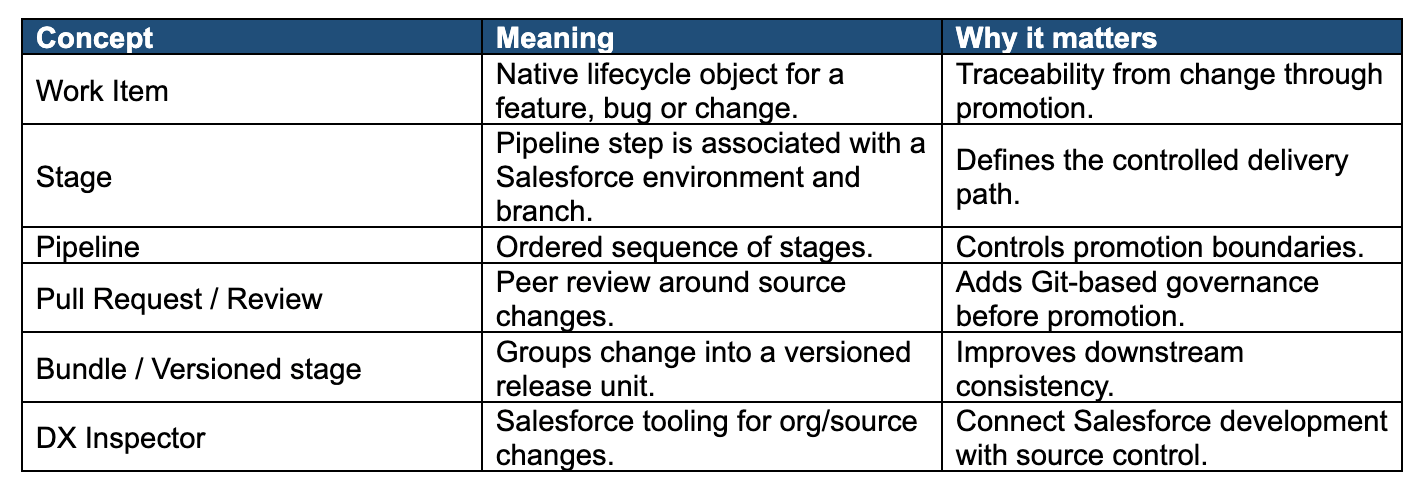
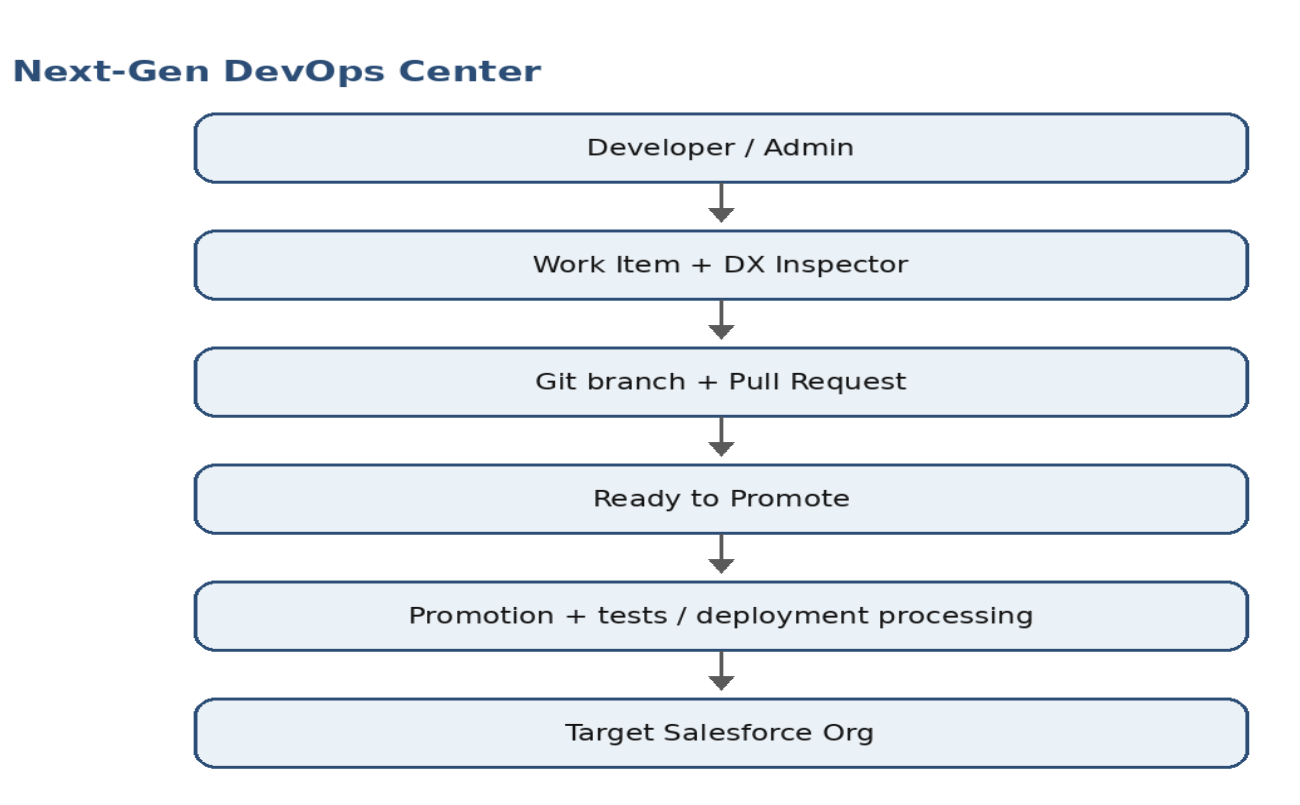
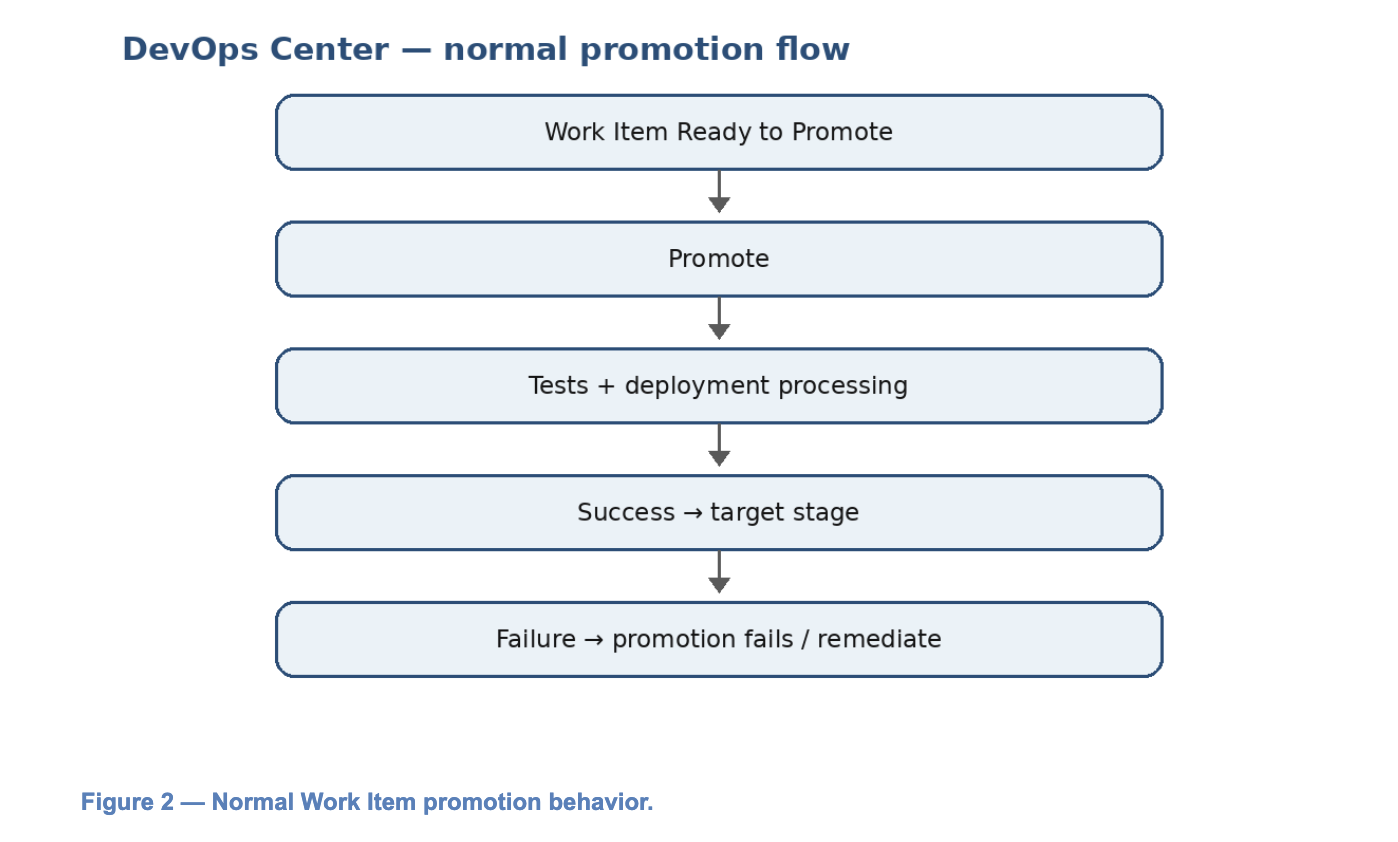
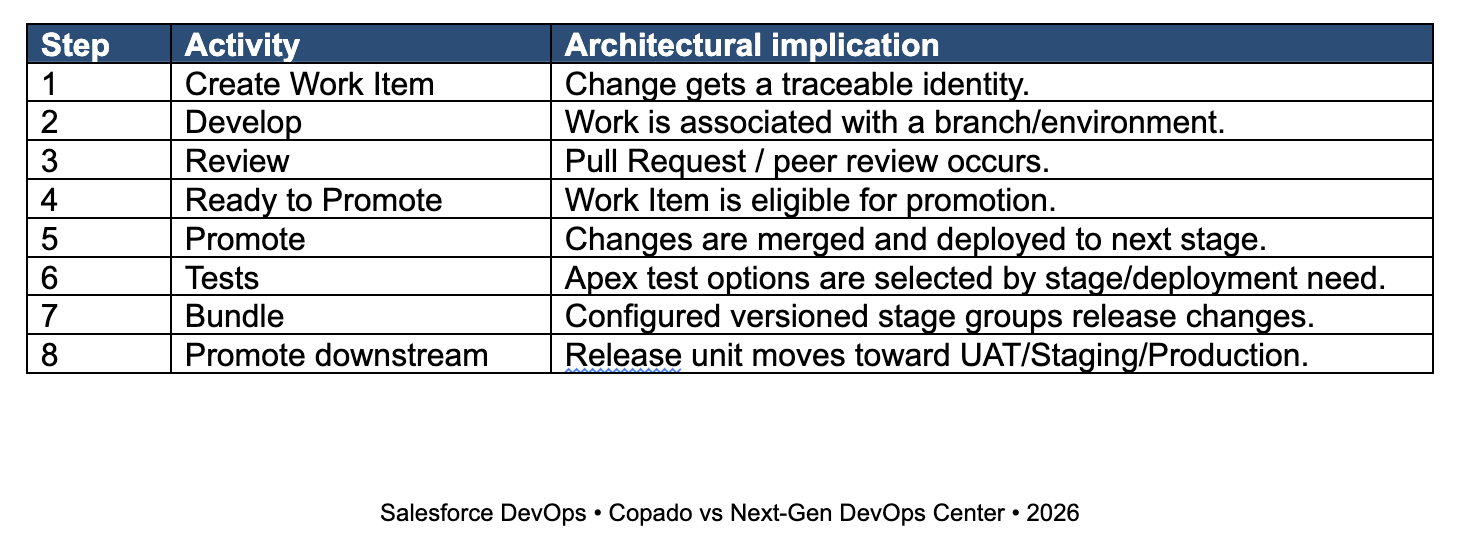
Next-Generation DevOps Center is Salesforce’s native DevOps experience for moving Salesforce changes through controlled, source-driven pipelines. Its model centers on Work Items, Stages, Git branches, Pull Requests, promotions, approvals, testing and versioned Work Item Bundles. The supplied document correctly presents Work Items as the lightweight unit of change and Stages as environment/branch mappings.
2. Promotion & Validation
DevOps Center supports validation through built-in testing and quality gates. For normal Work Item promotion, assigned test suites can run before a Work Item advances to the next stage. Validate-Only Deployment is also supported for bundling and versioned stages; it checks Apex tests and deployment results without saving components to the org and can be followed by Quick Deploy.
3. How DevOps Center Works
4. How Copado Works
Copado uses the same broad Salesforce/Git principles but exposes a richer lifecycle around User Stories, Promotions, Releases, deployment steps, validation and quality gates. Copado documentation describes separate Merge, Deploy, Merge & Deploy and Validate Changes operations, and its User Story model exposes validation deployment results.
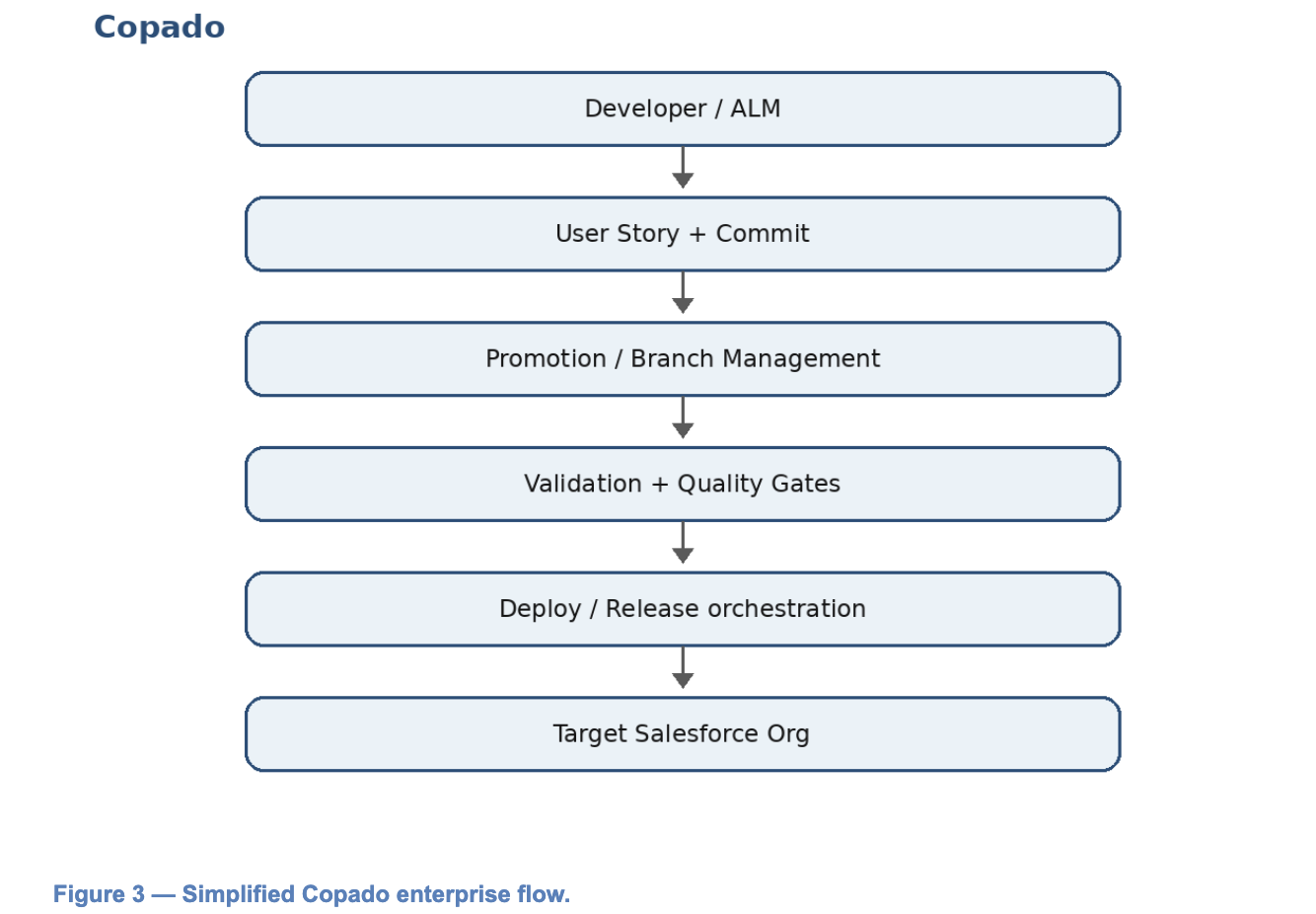
- User Stories can connect planning, build, test and delivery information.
- Promotion records can expose validation, deployment steps and job execution.
- Quality gates can be part of the promotion execution model.
- Copado is better positioned when release governance, ALM integration, multi-org orchestration and recovery are major operating requirements.
- The supplied document positions Copado AI alongside Salesforce’s DevOps Center AI/MCP direction; the two ecosystems are evolving quickly.
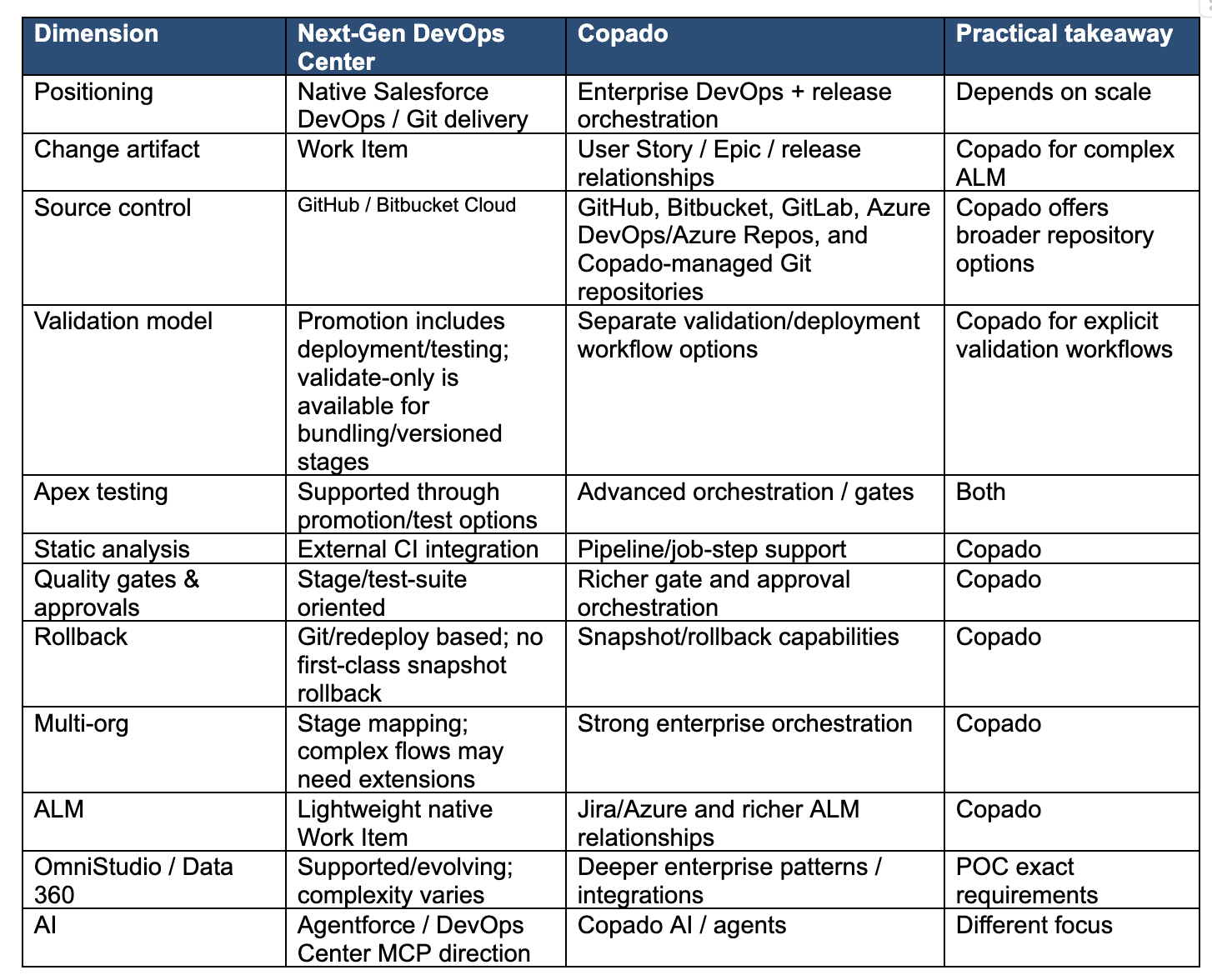
5. Copado vs Next-Gen DevOps Center
6. Governance & Release Control
Parallel release tracks: Next-Gen DevOps Center supports pipeline stages and concurrent Work Items, but its model is based on predefined stage sequences. For architectures such as DEV1 → QA1 → UAT1 and DEV2 → QA2 → UAT2 converging into shared Stage/Prod, with UAT-to-UAT or QA-to-QA synchronization between tracks, additional orchestration and governance are likely required. Back Sync is intended to update a development environment with the latest changes from the pipeline; it is not a general-purpose bidirectional synchronization mechanism between arbitrary UAT/QA environments.
Copado is generally stronger when teams need explicit validation, richer quality-gate orchestration, enterprise approvals, multi-org coordination, release governance and snapshot/rollback capabilities. DevOps Center provides a simpler native foundation using stages, Work Items, Git, testing, approvals and CI extensions.
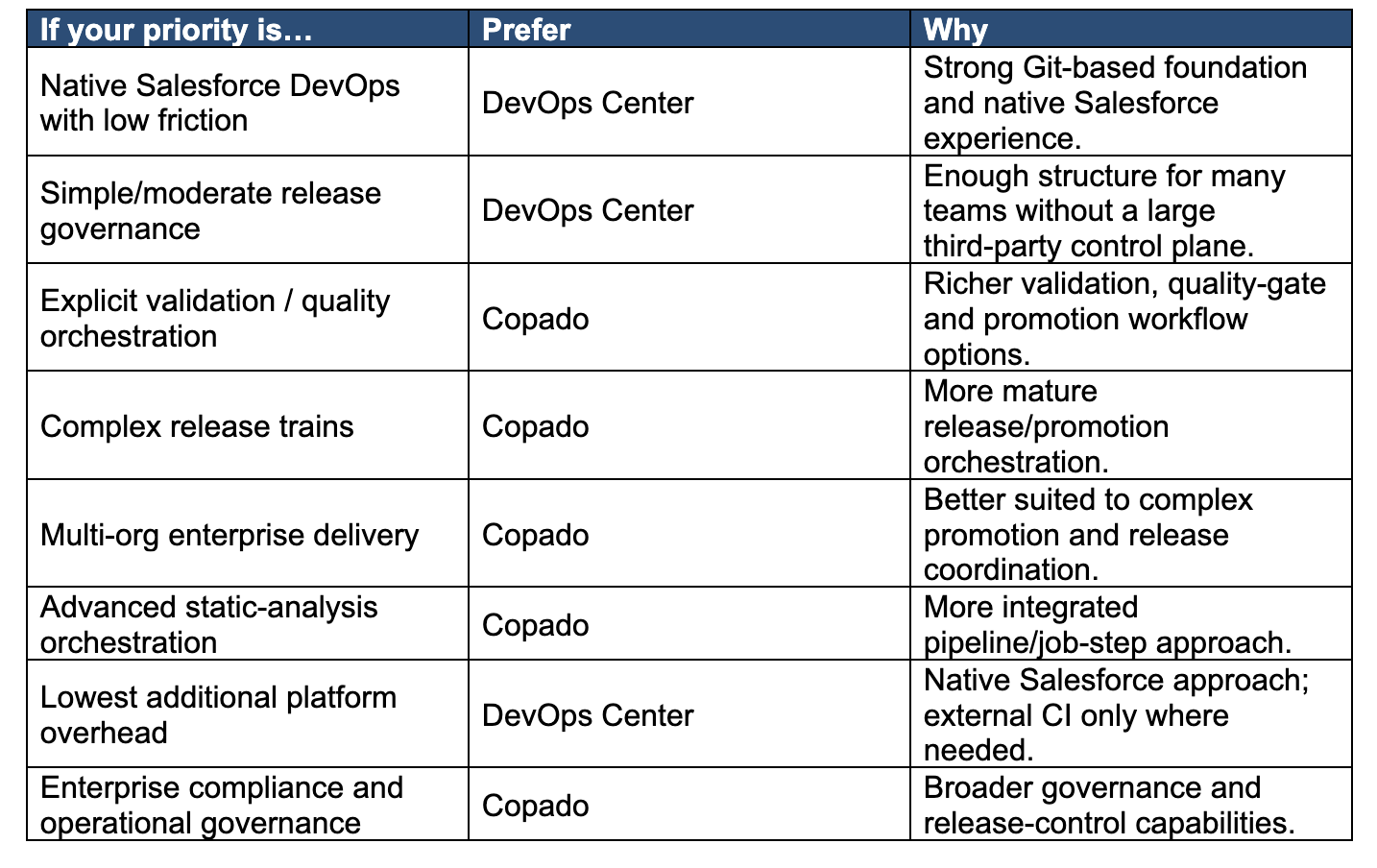
7. Which One Should You Choose?
Decision rules
- Choose DevOps Center where the primary goal is a native Git-based Salesforce delivery process with low friction and lower additional platform overhead.
- Choose Copado when multiple teams/orgs release trains, compliance, validation gates, advanced quality automation and recovery have become first-class operating requirements.
8. Implementation Guidance
If you choose DevOps Center
- Protect integration/UAT/production branches and require Pull Requests for meaningful changes.
- Source Control: DevOps Center — GitHub and Bitbucket Cloud
- Run PMD/ESLint or equivalent in CI because the supplied comparison identifies external CI as the practical static-analysis path.
- Use a bundling/versioned stage before UAT/Staging when releases contain multiple dependent Work Items.
- Document a recovery runbook. Salesforce’s current guidance says rollback through DevOps Center/GitHub is not currently supported as a first-class rollback operation; corrective Work Items are the operational path.
- Track deployment success rate, promotion duration, failures, manual interventions and post-release incidents.
If you choose Copado
- Align User Stories with Jira/Azure Boards rather than duplicating project-management data.
- Source Control: Copado — GitHub, Bitbucket, GitLab, Azure DevOps/Azure Repos, and Copado-managed Git repositories.
- Use validation promotions and quality gates before high-risk production releases.
- Define release, hotfix and back-promotion policies before onboarding many teams.
- Test snapshot/rollback runbooks rather than assuming recovery is automatic.
9. Implementation Guidance
Practical DevOps tips: (1) Keep Git as the source of truth and avoid treating a Salesforce org as the release baseline. (2) Separate PR/code-review approval from deployment approval. (3) Keep Work Items small and focused so dependency and promotion failures are easier to isolate. (4) During a POC, measure deployment success rate, promotion time, manual interventions and recovery time using the same scenarios in both tools.
DevOps Center and Copado should not be treated as interchangeable products with different UIs. They share Git, Salesforce metadata deployment and pipeline concepts, but they optimize for different levels of DevOps maturity.
References
- Salesforce — Next-Generation DevOps Center — https://help.salesforce.com/s/articleView?id=platform.next_generation_devops_center.htm&language=en_US&type=5
- Salesforce — DevOps Center Overview — https://help.salesforce.com/s/articleView?id=platform.devops_center_overview.htm&type=5
- Salesforce — Plan Your DevOps Center Setup — https://help.salesforce.com/s/articleView?id=platform.devops_center_plan_setup.htm&language=en_US&type=5
- Salesforce — Testing Before Promotion — https://help.salesforce.com/s/articleView?id=platform.devops_center_plan_setup.htm&language=en_US&type=5
- Salesforce — Validate-Only Deployment — https://help.salesforce.com/s/articleView?id=platform.devops_center_deployment_validate_only.htm&language=en_US&type=5
- Salesforce — Promotion Options — https://help.salesforce.com/s/articleView?id=platform.devops_center_promotion_options.htm&language=en_US&type=5
- Salesforce — Keep Your Development Environment in Sync / Back Sync — https://help.salesforce.com/s/articleView?id=platform.devops_center_run_back_sync.htm&language=en_US&type=5
- Salesforce — External Merges — https://help.salesforce.com/s/articleView?id=platform.devops_center_external_merge.htm&language=en_US&type=5
- Salesforce — DORA Metrics — https://help.salesforce.com/s/articleView?id=platform.devops_center_dora_metrics.htm&language=en_US&type=5
- Salesforce — Copado comparison source / official Copado documentation — https://docs.copado.com/
Verification note: Salesforce capabilities and licensing can change by edition, release, pipeline configuration, and product status.